Thank you for renewing your membership to Odiham District u3a. You can renew in the following categories:
- Individual member : £20. Note : if you joined after 1st May 2026, your membership is valid until the end of August 2027
- Associate member : £16. Use this if your primary u3a (the first one you joined) is not Odiham. You'll be paying full price to your primary u3a but discounted Associate Membership to Odiham and any u3a you joined after that
- Joint members : £40. This allows you to claim two lots of Gift Aid per couple. If you are not already setup as joint members, but wish to do so, you must first contact the membership secretary to get this actioned for you. More information on joint membership can be found here.
If you feel confident to do the renewal without help, then press the button below. Otherwise, please read, and possibly print out, the instructions below before you start.
By clicking on the “Renew” button below you are signing up to our Terms and Conditions and to our Privacy Statement.
Note : when you click on the button at the bottom of this page, the Beacon Members Portal will open up in a new browser tab, allowing you to go back to this page.
How to renew membership with a Beacon Members Portal login
You will be doing your renewal through a system called the Beacon Members Portal.
Step 1 : Go to the Beacon Members Portal and login
- Hit the "renew membership with a Beacon Members Portal login" button above. You will be taken into the Beacon Members Portal.
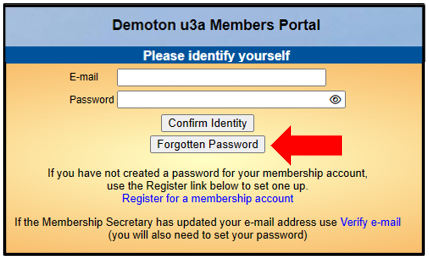
- Login using the your email and the password you created for Beacon Members Portal.
If you have forgotten this password, you will have to go through the "forgotten password" process (see the red arrow on the screen below).
Step 2 : Make your payment
Now we have to make the payment “using PayPal”. At this point, many people say, “I don’t have a PayPal account, nor do I want to create one”. That’s ok - you don’t have to.
We all know of PayPal as a way of making payments on e-commerce sites like eBay. To do this, we need a PayPal account.
However, PayPal is also simply a means of taking credit card payments. It is this PayPal functionality that Beacon uses. Thus, you don’t need a PayPal account to renew your u3a membership.
Making the payment using PayPal
The first screen you will see from PayPal is shown below. Yes, it says it's a login screen, but we are going bypass the PayPal login process.
- Enter your email address
- If you don't have a PayPal account and don't want to create one, then select "Pay by Debit...", as shown by the red arrow below.
If you don't see the screen below, but instead only have the option to log into PayPal, it is probably because you had a PayPal account at some point in the past and your browser is remembering this. This memory is provided by something called "cookies". In order to proceed you will have to delete these cookies from your browser.
Instructions on how to do this are given here (they will bring up a new tab in your web browser).
- Click on “Continue to Payment” (as shown by the upper red arrow)

- Enter your credit or debit card details.

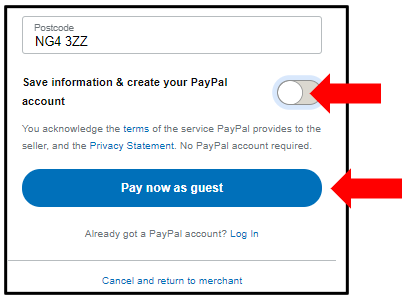
- If you still wish to pay by card, but don’t want to create a PayPal account, you must move the “Save information and create your PayPal account” slider to the left (as shown by the upper red arrow below).
- Now press “Pay now as guest” (You have now successfully avoided PayPal's repeated attempts to get you to create a PayPal account. Congrats.)